Page 5 of 9

Re: GTA for GE

PostPosted: Mon Jun 02, 2008 1:57 pm
by catacomber
The sidewalk is great. The one in GTA1 was bright colored but this one is fine.

Re: GTA for GE

PostPosted: Mon Jun 02, 2008 6:38 pm
by 4erv'
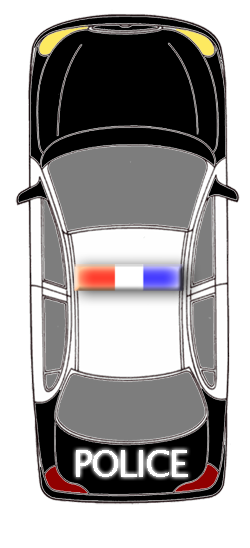
A police car: :)
police.png

Re: GTA for GE

PostPosted: Tue Jun 03, 2008 4:23 am
by catacomber
Are you going to have a sprite for the cars with the door open when the player gets in and out?

Re: GTA for GE

PostPosted: Tue Jun 03, 2008 7:38 am
by 4erv'
If the question is for me, the answer is YES. :D

Re: GTA for GE

PostPosted: Tue Jun 03, 2008 7:41 am
by 4erv'
Two dors must be opened, or one in the drivers side? Or 3 sprites, 1st with 1 door opened, 2nd with second door opened, 3rd with both doors opened? :mrgreen:

Re: GTA for GE

PostPosted: Tue Jun 03, 2008 10:47 am
by 4erv'
Here's a police car with opened drivers door. Is it okay? :)
(sorry, t had to put it in a .zip because it is 1 or 2 KiB too big, and i can't attach it :mrgreen: )
police_doors_opened_example.zip
(101.5 KiB) Downloaded 170 times

Re: GTA for GE

PostPosted: Tue Jun 03, 2008 11:38 pm
by feral
catacomber wrote:Are you going to have a sprite for the cars with the door open when the player gets in and out?


i would like to make some suggestions ( sorry if this has already been thought of)

- if you make the doors "separate sprites", you will save yourself a LOT of work. as you will not have to recreate 4 versions of the same cars in all possible rotations ie closed door car, left open door car, right open door car, both open doors car..).

instead if you make a seperate door sprite and rotate it around to every required angle, you will only need 1 sprite per door, then for any position the car is in, you will will be able to open the doors, as you simply select the next few animation position of the door sprite..

eg if the cars angle is 90 degrees, use the 90 degree rotation animation of the door ( parented) to show a shut door, then when opening change door to the 91, 92, 93, 94, 95 degrees sprite ( this also smoothly animates opening door, rather then slams open in one step)

if the car is rotated at say 70 degrees, the 70 degrees rotated sprite of the door will show a shut door, then to open simply change door to 71, 72,73,74 degree door sprite etc ... obviously the opposite door would change to 69,68,67,66 degrees... 9 depending how you set up the opposite door sprite)

hope that makes sense..

also to help even more with ease of development, I would be tempted to make all doors, on all cars, the same size, then you only need two door sprites ( left and right) and use R,g,b, settings to match the paint colour of individual cars.. ( but i am a lazy graphics person LOL)

if that doesn't make sense let me know, and i will do a demo if you think it is a good idea..

cheers
feral

ps, if you try something like this, remember a sprite rotates around the center, so your door would need to have the "hinge" situated at the center of the sprite, this allows the door to always be parented to the car in the same place..

Re: GTA for GE

PostPosted: Wed Jun 04, 2008 1:08 am
by catacomber
That makes a lot of sense to me and I think it would be very helpful if you would make a demo. :D

Re: GTA for GE

PostPosted: Wed Jun 04, 2008 6:10 am
by feral
catacomber wrote:That makes a lot of sense to me and I think it would be very helpful if you would make a demo. :D


ggrrr... always someone who takes up the offer of a demo... :lol:

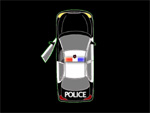
anyhow attached is a "very" rough demo of what I meant about seperate door sprites..
cardoor1.jpg
cardoor1.jpg (10.39 KiB) Viewed 3816 times

CARDOOR.zip
ged files
(652.05 KiB) Downloaded 181 times


it is very rough because i did not do any cleaning up of stray pixels, and only roughly cut and paste the rotated doors, so the door sort of seems a bit jumpy, but believe me, if time was spent on lining it all up..the the door would fit OK..( it's only a demo :?

anyhow, the idea is, draw your car and rotate as many times as needed to make a full rotation ( in this case it would be 36 turns as i turned by 10 degrees each time)

then do the same with a door, ( only 36 turns) ( .....and then the opposite side door)

then match up the same animpos for the door as with the car ( ie: if car.animpos=15 then door.animpos=15) etc

but when the door opens simply leave the car at animpos 15 and cycle through the next 4 or five doors to open the door,.. then cycle back to close.. I hope that makes sense as my code is probably not the best way to do it.. but if you watch the demo you should figure it out..

the only other trick is to make sure all your "door" animations have the hinge in the exact center of the sprite so that the sprites x,y, always centers around the hinge....mine is only roughly lined up which is why it jumps a bit..

then to position the hinge - use that groovy circling code to move the hinge in a circle around the centerpoint of the car... so that depending on what angle the car is pointing at the hinge is rotated around to the correct distance and angle from the center of the car.

this gives you any combination of open and shut doors at any angle, with only 3 sprites.

hope that helps
:)

feral

PS: I only animated the door actually opening ( it slams shut.. LOL) but it is just as easy to animate shutting the door...
if the animation doesn't show well.. try setting the games framerate lower..

OH.... keys

left/right cursor to turn ( only turns 5 steps as too lazy to do a full rotation)
space to open shut door.

Re: GTA for GE

PostPosted: Wed Jun 04, 2008 8:23 am
by Spidy
4erv' wrote:Here's my taxi... :D
taxi copy.png


Nice Taxi

Re: GTA for GE

PostPosted: Wed Jun 04, 2008 8:25 am
by 4erv'
Spidy wrote:
4erv' wrote:Here's my taxi... :D
taxi copy.png


Nice Taxi

Thanks! :D

Re: GTA for GE

PostPosted: Wed Jun 04, 2008 8:30 am
by Spidy
feral wrote:
catacomber wrote:That makes a lot of sense to me and I think it would be very helpful if you would make a demo. :D

ggrrr... always someone who takes up the offer of a demo... :lol:

anyhow attached is a "very" rough demo of what I meant about seperate door sprites..
cardoor1.jpg

CARDOOR.zip


it is very rough because i did not do any cleaning up of stray pixels, and only roughly cut and paste the rotated doors, so the door sort of seems a bit jumpy, but believe me, if time was spent on lining it all up..the the door would fit OK..( it's only a demo :?

anyhow, the idea is, draw your car and rotate as many times as needed to make a full rotation ( in this case it would be 36 turns as i turned by 10 degrees each time)

then do the same with a door, ( only 36 turns) ( .....and then the opposite side door)

then match up the same animpos for the door as with the car ( ie: if car.animpos=15 then door.animpos=15) etc

but when the door opens simply leave the car at animpos 15 and cycle through the next 4 or five doors to open the door,.. then cycle back to close.. I hope that makes sense as my code is probably not the best way to do it.. but if you watch the demo you should figure it out..

the only other trick is to make sure all your "door" animations have the hinge in the exact center of the sprite so that the sprites x,y, always centers around the hinge....mine is only roughly lined up which is why it jumps a bit..

then to position the hinge - use that groovy circling code to move the hinge in a circle around the centerpoint of the car... so that depending on what angle the car is pointing at the hinge is rotated around to the correct distance and angle from the center of the car.

this gives you any combination of open and shut doors at any angle, with only 3 sprites.

hope that helps
:)

feral

PS: I only animated the door actually opening ( it slams shut.. LOL) but it is just as easy to animate shutting the door...
if the animation doesn't show well.. try setting the games framerate lower..

OH.... keys

left/right cursor to turn ( only turns 5 steps as too lazy to do a full rotation)
space to open shut door.


Nice demo thank u feral

Re: GTA for GE

PostPosted: Wed Jun 04, 2008 9:12 am
by 4erv'
Like i understand, now i must do all this rotating cars and doors? :shock:

Re: GTA for GE

PostPosted: Wed Jun 04, 2008 9:15 am
by Spidy
lol yes!!

Re: GTA for GE

PostPosted: Wed Jun 04, 2008 11:16 am
by DST
Here is the minimap demo I promised Spidy.

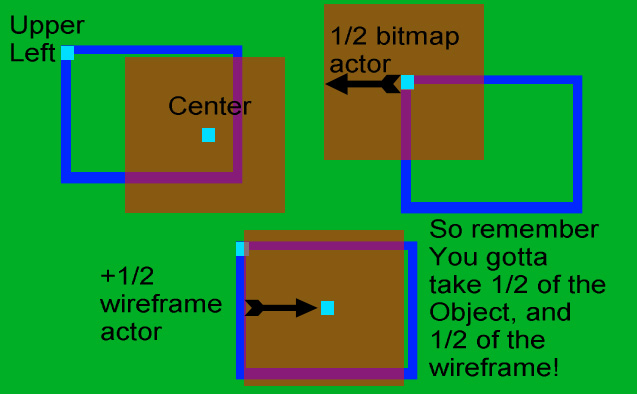
Inside the draw actor event for the canvas actor, you will see an explanation of the formula I used. Here also is a visual explanation of converting wireframe(canvas) coordinates to bitmap object coordinates for minimap drawing.

ob2wf.jpg