Page 2 of 3

Re: sprite maker beta 3

PostPosted: Tue Jul 08, 2008 4:09 am
by DST
So i used the program, found a small bug, and helped you improve your program.
Then i used the program, created a new monster, and helped me improve my program.

ecbsnake.jpg

See how this works, ppl? :D

Re: sprite maker beta 3

PostPosted: Tue Jul 08, 2008 4:25 am
by feral
DST wrote:So i used the program, found a small bug, and helped you improve your program.
Then i used the program, created a new monster, and helped me improve my program.
See how this works, ppl? :D


looks great ! :)
BTW. a point for you for your help with this, thanks...

feral

Re: sprite maker beta 4 - now with scaling

PostPosted: Sat Jul 12, 2008 6:08 am
by feral
BETA 4.0 now with scaling

This version allows you to scale any 24bit bitmap from below 100 percent to above (does not yet go backwards)

Use the scaling options below the preview window instead of the rotation options to the right.

A preview of the scaled sprites will appear on screen, AND will save as series of bitmaps.

I am not worried about making spritesheets for these, as there would simply be too much "fill" around the smaller images resulting in very big files.

you will note that as there is no need for "fill" in the individual images , it has been removed on the scaled images.

please test this out and try all sorts of images.. if you find some that do not work let me know, or if you try heaps of different types and they all worked... please let me know that to.. if there is anything not working or any requests for features etc etc etc

try it with photos too ... you will be amazed :shock:

WARNING NOTES:
1. as this writes files to your hard drive, I can't be held responsible for any damage that may occur ( sorry had to put that in :lol: )
2. IT WILL overwrite existing files of the same name(s).. i will be adding a test for this soon
3. I forgot on the scaling section to give you a pop-up, to let you know the process was complete... please wait until all disk activity has ceased before closing it down, as it may still be in the process of writing files..
4. the export filename for "scaled" sprites is different from the filename box for rotated sprites so make sure you fill in the correct one ( the one at the bottom left corner)
5.it still sometimes creates one extra frame more then asked for, this is always the "last, or highest numbered" frame/image, and sometimes that particular one will have very odd scale (I will be fixing that soon), in the meantime if you get an extra frame, simply delete the highest numbered image in the series if you don't want it.
5.PS: the rotation section still needs to be restarted ( ie: reload the spritemaker app) after each image is processed... another fix on the list..

oh, and unlike the rotation section, the scaling section allows you to load new images and modify them over and over.. ( no need to shut it down and restart it ..)

you can now...if you want to try ... create rotozoomed sprites.. ie: ones that zoom in and out, while rotating :D
I am actually planning on creating automatic version of rotozooming with this app soon, but in the meantime you will have to work it out yourself :twisted:

have fun and please get back to me..
feral

Re: sprite maker beta 5 - now with scaling & FX

PostPosted: Mon Jul 14, 2008 3:16 am
by feral
UPDATED TO BETA 5.0

beta 5.0, now has the First f what will be a series of sprite effect's availiable in future versions, this is only a test run
to tryout,

TO USE: Instead of selecting export rotated ( as in previous versions) select EXPORT DISSOLVED
IT creates a spritesheet (spritesheet only, no single files) of your sprite slowly dissolving.. a simple first example, but as I said it is simply a preview/test of upcoming features..

let me know if you like the idea of a sprite FX creator ?

attached is a sample spritesheet created by the program

if you don't want to download the program.. just download the sheet and try it..

see first post for example spritesheet and latest executable

Re: sprite maker beta 5 - now with scaling & FX

PostPosted: Sat Jul 19, 2008 12:51 pm
by pyrometal
This is pretty amazing work feral! I'm glad to see the code I created along with gogo is being expanded upon!

Re: sprite maker beta 5 - now with scaling & FX

PostPosted: Thu Jul 24, 2008 4:39 pm
by zygoth
this could be really useful for me later...right now i am using a different program. once you get some of the new features on there I think it will be very helpful to everybody on the forums. By the way, pyro, does this mean you are officially back? i'm still waiting for some more mazeman, you know.

Re: sprite maker beta 5 - now with scaling & FX

PostPosted: Fri Jul 25, 2008 12:12 am
by feral
zygoth wrote:right now i am using a different program


I would be interested to know what the program is you are using ? so i can see what features i need to work on...

Re: sprite maker beta 5 - now with scaling & FX

PostPosted: Wed Jul 30, 2008 10:00 am
by DST
Ok i got a suggestion for ya.....i got a transforming spaceship, with lots of parts. The part rotate on axis, like an arm rotates on a shoulder. It seems it would be very difficult to move their xy's along with the animation, and still keep the thing together, using a normally rotated sprite. So how bout adding axis to sprite maker?

Re: sprite maker beta 5 - now with scaling & FX

PostPosted: Wed Jul 30, 2008 10:33 pm
by feral
DST wrote:Ok i got a suggestion for ya.....i got a transforming spaceship, with lots of parts. The part rotate on axis, like an arm rotates on a shoulder. It seems it would be very difficult to move their xy's along with the animation, and still keep the thing together, using a normally rotated sprite. So how bout adding axis to sprite maker?


sounds like a cool idea :D

do you mean something like the "door opening" solution I posted on the GTA thread ?

viewtopic.php?f=1&t=5741&st=0&sk=t&sd=a&hilit=gta&start=60#p40294

or something more complex ?

feral

PS: I can now open and save transparency capable TGA files - Just working them into the sprite maker now.. so transparency's coming soon :D

Re: sprite maker beta 5 - now with scaling & FX

PostPosted: Wed Jul 30, 2008 10:54 pm
by Rux
This program is AMAZING!!!! I'm going to try to make a rocket battle game, rotating the rockets with this!!!

Re: sprite maker beta 5 - now with scaling & FX

PostPosted: Fri Aug 01, 2008 1:27 am
by DST
yes something like the door opening, not much more complex.....kinda like a ragdoll, except the torso doesn't rotate or apply inertia to the limbs.

Re: sprite maker beta 5 - now with scaling & FX

PostPosted: Fri Aug 01, 2008 2:06 am
by Lexcondran
Dst i had an idea for your meteors game. You could add sound and use the mouse to move and shoot.

Re: sprite maker beta 5 - now with scaling & FX

PostPosted: Sat Aug 02, 2008 7:26 am
by feral
DST wrote:So how bout adding axis to sprite maker?


It took me a while to figure out what you meant...I hope I got this right... basically you want to be able to decide where the center point is of the rotation ?

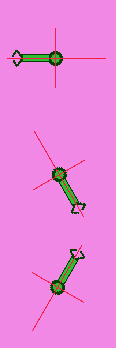
if so, I am planning on adding that option in... but in the mean time you can do it manually.. all you have to do is make sure your sprite is evenly numbered ie width and height are even numbers ( so the rotation has a dead center) and make sure the centerpoint you want to rotate around, is in the centre of the sprite..

that is, the entire sprite background included should be evenly numbered, not the actual character/item/artwork... that can be anysize.. the program simple rotates around the center so by moving the artwork you can change the center,,

eg
in this first example the "robot arm" sprite rotates around the roughly in the middle of the arm... NO GOOD :(
shoulderA.jpg

in the second example the sprite (background ) was made larger and the shoulder joint was then centered in the sprite... ...now, it rotates around the shoulder... GOOD :)
shoulderB.jpg


if that is what you mean ?, then yes I am planning on adding it in soon, you will be able to select the center and the sprite will adjust its size so that the center is correct.

In the mean time it can be done manually....

feral

Re: sprite maker beta 5 - now with scaling & FX

PostPosted: Wed Aug 06, 2008 2:12 am
by speckford123
I agree with what others have said...........this is awesome..........
and will save ALOT of time, you gave me more inspiration :lol:
+point

Re: sprite maker beta 5 - now with scaling & FX

PostPosted: Sun Aug 24, 2008 3:24 pm
by paperboy321
I am confused how to make it please post how step by step.


Thanks