Re: Super Stick Brawl demo
 Posted: Mon Jun 18, 2018 7:24 am
Okay, another quick question: How do I make an actor follow another actor on a particular spot?
Posted: Mon Jun 18, 2018 7:24 amPosted: Sat Jun 30, 2018 12:59 amPosted: Wed Aug 08, 2018 11:17 amKcee wrote:... Sometimes when I look at my progress, I feel forced to give up on the game. It just seems impossible to complete. I am still amazed at how Bee-Ant...
Posted: Sat Aug 11, 2018 6:17 pmPosted: Sat Aug 11, 2018 6:19 pmPosted: Sat Aug 11, 2018 6:32 pmPosted: Mon Aug 13, 2018 7:44 pmPosted: Mon Aug 13, 2018 9:05 pmPosted: Mon Aug 27, 2018 8:03 pmlcl wrote:Kcee wrote:Can someone help me out with this?
At the beginning of the game, the player types in his name and later on in the game, an NPC would talk to the player and I want him to mention the player's name.
Create a new string variable, then use sscanf() to read the contents of the text box (if you don't know how to make a text actor into a text input actor, all you have to do is to select "Yes" on the "Text Input" option in the "Text" panel of the actor).
sscanf() stands for:
- string
- scan
- format
What it does is that it reads data from a string. You give it the format it uses for finding the data, and then you give it pointers to the variables you want it to store the data to. The formatting works just like the formatting on sprintf(), if you're familiar with that. Here's an example to get you started:
- Code: Select all
// The first argument "text" defines what string you want to scan.
// We want to scan the contents of the text box actor's text,
// so if we are in an event of that actor, that would be "text"
// (which is equal to "myTextInputActor.text", if that's the name of the actor).
// The second argument is the formatting used for reading.
// As we only want to read a string from the text, the formatting is simply "%s",
// which stands for string.
// The third argument is the pointer (i.e. the memory address) to the string where
// we want to store the result of the scan. As we want to read it to our variable, just
// input the name of the variable, preceded by "&", which is the "address-of" operator.
sscanf(text, "%s", &myName);
The lines that begin with "//" are comments, not code. The code alone without the comments is:
- Code: Select all
sscanf(text, "%s", &myName);
Hope this helps! If you have trouble understanding it or using it, just ask and I'll explain it to you.
Posted: Tue Aug 28, 2018 1:18 pmPosted: Tue Aug 28, 2018 9:53 pmPosted: Sun Sep 02, 2018 6:19 pm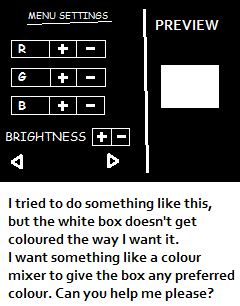 Posted: Mon Sep 03, 2018 6:32 am
 whitebox.r (-=)+= 5;Menu_Border.r=whitebox.r;
Menu_Border.g=whitebox.g;
Menu_Border.b=whitebox.b;
textactor.r=whitebox.r*-1; // I don't know if this can work. Also for green and bluewhitebox.r±=5;
whitebox.g±=5;
whitebox.b±=5;
Posted: Thu Sep 06, 2018 7:14 pmPosted: Thu Sep 06, 2018 11:15 pm
