Page 4 of 5

Re: off topic - game editor sprite tool

PostPosted: Mon Aug 29, 2011 8:51 pm
by skydereign
Game A Gogo wrote:
skydereign wrote:Also anyone who wants to build their own iphone games needs a mac as well.

I though you could export to iphone on windows and linux?

You can export the .dat file, but you can't build it for iphone without xcode. The geplayer allows you to get around that though.

Re: off topic - game editor sprite tool

PostPosted: Sat Sep 03, 2011 5:46 pm
by SuperSonic
Hey, I just tried out the newest version and I really like the new "view on desktop" function. However, it would be nice if there was an "x" button that appeared when you hovered your mouse over the animations :wink:

Just sayin

Re: off topic - game editor sprite tool

PostPosted: Wed Sep 07, 2011 1:10 pm
by j2graves
So this project is still going on? :D
I thought it was abandoned a long time ago. Well I'll be looking forward to the final product! Hopefully it'll become an official program for use with GE.

Re: off topic - game editor sprite tool

PostPosted: Thu Sep 08, 2011 1:00 pm
by FeralX
j2graves wrote:So this project is still going on? :D
I thought it was abandoned a long time ago. Well I'll be looking forward to the final product! Hopefully it'll become an official program for use with GE.


Yep, I am back and I am serious about this.. this is the sort of tool I always wanted when I was first here.. :)

BTW A new update is due this weekend.. :D

and yeah I am hoping it will be an official GE tool.. Thats why I am doing it, to pay you all back for the help you guys gave me..

The question is.. I only have 2..... TWO !.. :( people actively downloading and trying it out... Is it becuase this is such and old thread and most people just ignore it ?

Should I start a new thread ? is there a Mod who can advise whether I should ?

Feral

Re: off topic - game editor sprite tool

PostPosted: Fri Sep 09, 2011 1:09 am
by skydereign
Starting a new thread won't help much, though it'd be okay if you want to try that. Not really sure how you could attract more testers, besides supporting linux and mac.

Re: off topic - game editor sprite tool

PostPosted: Fri Sep 09, 2011 2:46 pm
by Jagmaster
I finally got around to testing it WOHOO!
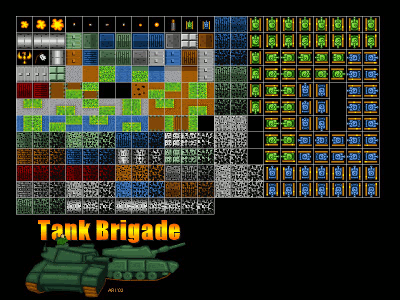
This tool is quite handy! It would be nice if the sprite sheet importer had a feature that you could set the starting coordinates of the first cell. This would be handy for a sheet like this.
tankbrigade.gif

By the way, I was having trouble importing a bitmap sprite sheet, should I use png instead?

Re: off topic - game editor sprite tool

PostPosted: Sat Sep 10, 2011 10:23 am
by FeralX
Jagmaster wrote:I finally got around to testing it WOHOO!
This tool is quite handy! It would be nice if the sprite sheet importer had a feature that you could set the starting coordinates of the first cell. This would be handy for a sheet like this.
tankbrigade.gif

By the way, I was having trouble importing a bitmap sprite sheet, should I use png instead?


Thanks for the feedback, I found out what the issue was with some bitmaps, and it will be fixed in next release :) They use an indexed color pallette :| who knew...


The spritesheet you posted will require some "cropping" methods that I am still working on, but it does sound like a good thing to do.. working on it now.

Can you send the original Sheet to me ? and or the link to it ? or a similar one ?

Email feralx at ymail.com (replace the spaces and the word at with @ as usual)

BTW if anyone else has any sprite sheets or sprites that do not work with this proggy, or that they want tools for, please send the original sprites spritesheets etc to the above email with your request or issue..

cheers
Feral

Re: off topic - game editor sprite tool

PostPosted: Sat Sep 10, 2011 1:03 pm
by Game A Gogo
FeralX wrote:They use an indexed color pallette :| who knew...


uh.. isn't that only the case for 16 and 256 color bitmaps? as far as I know 24-bit and 32-bit have no color palette...

Re: off topic - game editor sprite tool

PostPosted: Sat Sep 10, 2011 2:31 pm
by j2graves
I downloaded the latest version and I have some feedback for ya.
- If I make any changes that resize the border of the image, and I click "restore original", the image will automatically resize to fit the new border until I mess with the zoom.
- If I try to rotate an image by typing the angle in, the mini preview will not show me the change until I click "OK".
- If I click "reset" on the rotation without making any changes, the border will automatically increase in size.

Well that's my feedback. Overall it's a great, simple program that will be very helpful when it is completed :)

Re: off topic - game editor sprite tool

PostPosted: Sat Sep 10, 2011 10:33 pm
by FeralX
Game A Gogo wrote:
FeralX wrote:They use an indexed color pallette :| who knew...


uh.. isn't that only the case for 16 and 256 color bitmaps? as far as I know 24-bit and 32-bit have no color palette...


yes, you are correct. Sorry I didn't explain myself well.. anyhow the tileset jagmaster sent was a 256 color bmp, and it is the first time I had loaded one for a while, so I was not expecting to have all the problems I did. I should have tested better. Some of the C# imageing methods will not work with indexed pallettes.

Just a note on that, this application currently converts everything to 32bits internally to work with it (a result of solving the above problem) .

Which means when you save it it will be 32 bits even if it was a 8 bit or indexed bitmap originally. Some "simpler" modifications will remember the original format and save the pallette, but for most they will be converted.

This is something I am working on, and eventually you will be able to save back out to whatever number of bits you want , with or without an indexed pallete.

And you will also be able "downgrade" the number of colors if required, ie: 32bits to 8bits ( with some color loss) But this is a future thing, as I don't think there is any urgency for it as GE likes 32bit sprites :D

Re: off topic - game editor sprite tool

PostPosted: Sat Sep 10, 2011 10:35 pm
by FeralX
j2graves wrote:I downloaded the latest version and I have some feedback for ya.
- If I make any changes that resize the border of the image, and I click "restore original", the image will automatically resize to fit the new border until I mess with the zoom.
- If I try to rotate an image by typing the angle in, the mini preview will not show me the change until I click "OK".
- If I click "reset" on the rotation without making any changes, the border will automatically increase in size.

Well that's my feedback. Overall it's a great, simple program that will be very helpful when it is completed :)


Thanks for the feedback. I have fixed the above problems (I hope), and the fixes will be in the new release.
cheers
Feral

Re: off topic - game editor sprite tool

PostPosted: Sat Sep 10, 2011 11:44 pm
by FeralX
I have updated the beta to version .030 and removed any old versions

Becuase I changed accounts half way through this thread, I can't actually edit the first post to upload the latest copies sorry (I probably should start a new thread just to make that happen ?)

anyhow this link "should" take you straight there, if not, it is about two pages back from this post on this thread. sorry

viewtopic.php?f=8&t=6218&start=30#p75254


Updates

It now correctly saves numbered files with leading zeros eg: 001 002 003 .........010,011,012 ...... 998 999.

It now allows custom sprite grids ie: you are no longer restricted to a single row or column

It will automatically calculates all combinations of rows/cols for sprite grid that does not include blank frames
eg: a 12 frames sprite can be saved as 1*12 12*1 3*4 4*3 6*2 or 2*6 and these options a precalculated so you do not have to guess which combinations will work

note: I will shortly add the facility to create sprites sheets in ANY combinations even if it has balnk frames ( although not sure how useful that is)

Fixed some issues importing bitmaps - bitmaps with "indexed colors" were the problem

The "Animate on Desktop: feature is now much easier to use - Mouse "grabbing" improved, and you can right click to get a context sensitive menu (to start/stop/exit)

All frame selection techniques, and all animation frame counts are now linked, so all windows are now synchronised to what is occuring in other windows

Removed the old "Animation" form (sub window) as it is no longer required -it is now replaced permanently by the "animate on desktop" feature

The main form is also now also an animation player and linked with Slides, and linked with the Desktop Animator - the main menu has the player controls that control all windows.

The Main form can be minimised allowing only the Desktop Animation to Display makingh it easier to disply over your "game" to test

Fixed a "lot" of other minor bugs

Oustanding Issue - large Images can cause errors if creating sprite sheets (an internal limit in bitmap size)

Re: off topic - game editor sprite tool

PostPosted: Sun Sep 11, 2011 8:59 am
by HitoV
Holy cow this is amazing!!!! Thanks!!! In only about 2 minutes of trying I was able to have a few pictures rotated/scaled and imported into the game. Looks really nice! Only encountered one bug which was the "Restore original." Both times I click on that it acted funny. The first time it crashed and the second time it auto-cropped the output picture. Both times it was after rotating a one frame picture.

Great tool man!!!! :mrgreen:

Re: off topic - game editor sprite tool

PostPosted: Sun Sep 11, 2011 1:19 pm
by Jagmaster
Sorry to get back to you so late, I saw you already made an update. I was able to import my sheet without error on the new version! :D I'll still need to play around with it a bit longer to find any more bugs.

Re: off topic - game editor sprite tool

PostPosted: Sun Sep 11, 2011 5:46 pm
by j2graves
FeralX wrote:
j2graves wrote:I downloaded the latest version and I have some feedback for ya.
- If I make any changes that resize the border of the image, and I click "restore original", the image will automatically resize to fit the new border until I mess with the zoom.
- If I try to rotate an image by typing the angle in, the mini preview will not show me the change until I click "OK".
- If I click "reset" on the rotation without making any changes, the border will automatically increase in size.

Well that's my feedback. Overall it's a great, simple program that will be very helpful when it is completed :)


Thanks for the feedback. I have fixed the above problems (I hope), and the fixes will be in the new release.
cheers
Feral

I'm afraid they don't seem to be fixed. In the case of "restore original", there is an even worse glitch now. Now when I click "restore original" I get a pop up that says "unexpected exception has occurred in your application."