Page 2 of 3

Re: Point and Click Game

PostPosted: Tue Sep 16, 2008 2:17 am
by BlarghNRawr
rhats what i thought, cuz you only wanted left and right animations

Re: Point and Click Game

PostPosted: Tue Sep 16, 2008 2:23 am
by GuybrushThreepwood
and i wanted away and towards the screen animations

Re: Point and Click Game

PostPosted: Tue Sep 16, 2008 11:00 am
by edh
This should be easy enough to do with the example I gave. If you look at the scripts for mouse down left and move finish you can see that it uses some simple geometry to figure out where the mouse click is in relation to the actor. Then it changes the animation. If you only want 4 animations (instead of 8 ) just change the script to a quadrant or whatever you need. If you have to, draw it out on paper and figure it out there first.

The animation itself is top down, but it could be anything you wanted. I used it as an example because I already had it from something previously.

Anyone is going to need to be able to do scripting to be able to do a simple game like the kinds of topics you are asking about (inventory, movement, etc).

Re: Point and Click Game

PostPosted: Tue Sep 16, 2008 10:57 pm
by GuybrushThreepwood
what am i changin to a quadrant?

Re: Point and Click Game

PostPosted: Tue Sep 16, 2008 11:42 pm
by edh
You know when you click in the screen? You need to figure out where that click was so that you can make a sensible choice of which animation to use.

No matter where on the screen you click, you can draw a single imaginary line (vector) between the click point and the point where the actor is. From that you can figure out the angle (like the degrees of a circle, but in radians instead of degrees).

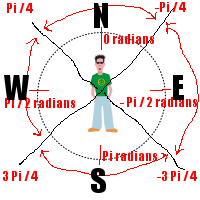
In this case, North is 0, South is Pi (this is radians). Everything East is negative between 0 and -Pi. Everything West is positive between 0 and Pi.

You can see all the if (rads < -.4 && rads > 0) type stuff in the two actions I mentioned in an earlier post. Mine are 8, you can divide the numbers up into 4 (a quadrant).

If you can understand that direct North is 0 and direct South is Pi, then East is (- Pi / 2) and West is (Pi / 2).

To divide it up into a quadrant, you might use (just my own numbers, make up your own) rads < (Pi / 4) and > (- Pi / 4) is animate away, rads < (- Pi / 4) and > (- 3 Pi / 4) is animate Right, rads > (3 Pi / 4) or < (- 3 Pi / 4) is animate towards us and rads > ( Pi / 4 ) < (3 Pi / 4) is animate Left. Simple, right? It's a quadrant. You can tweak the numbers if you don't want the guy to animate up if someone clicks near to 45 degrees (clockwise/counter) from North. Maybe you want it to be more like 30 degrees left and right of North.

Re: Point and Click Game

PostPosted: Wed Sep 17, 2008 12:35 am
by GuybrushThreepwood
I'm jus not graspin it. Cud u make a demo please? :oops:

Re: Point and Click Game

PostPosted: Wed Sep 17, 2008 2:10 am
by edh
Did you look at the code, yet? Do you see what I'm talking about? The if statements... the numbers. That stuff.

Re: Point and Click Game

PostPosted: Wed Sep 17, 2008 2:24 am
by GuybrushThreepwood
I tried, but all that happened was it changed to the bacward animation an wouldnt do anythin else

Re: Point and Click Game

PostPosted: Wed Sep 17, 2008 2:38 am
by edh
Here is a visual of what I'm talking about.

illustration.png
Illustration of the quadrants around the actor for clickable regions and 4 animation cycles.


The illustration shows due North, South, East and West. They have a known value, in radians. radians = atan2(dx, dy) where dx = actors x - mouse x and dy = actors y - mouse y. This is in the script action for both mouse down left and move finish. You can see the actual math in the demo I provided earlier in the thread.

The illustration also shows the values for dividing up the screen into clickable quadrants relative to the actor. (The giant black X across the picture.) The values are just 1/2 the value of say, due North and due East. Northeast is (N + E) / 2, right?

If you don't understand what radians and Pi have to do with the circle, just think of them as numbers that you already know. You don't need to convince yourself of how I got them. Just treat them as numbers.

In this way, the clickable area is always relative to the actor. If the actor moves, the math still works and it makes sense when you click and actor animates. The animation seems sensible for the location of the click.

Re: Point and Click Game

PostPosted: Wed Sep 17, 2008 2:42 am
by edh
If you still don't get it, just upload your example which isn't working. I'll see if I can tell you how to fix it. That way you will still be writing your own game and hopefully it will make more sense. :lol:

Re: Point and Click Game

PostPosted: Wed Sep 17, 2008 2:51 am
by GuybrushThreepwood
i dont no how 2 up load a game

Re: Point and Click Game

PostPosted: Wed Sep 17, 2008 3:28 am
by edh
When you post a reply, there is a blue box below "save" "preview" "submit". It looks like tabs. One says "upload attachment".

Re: Point and Click Game

PostPosted: Wed Sep 17, 2008 3:57 am
by GuybrushThreepwood
it says The extension ged is not allowed

Re: Point and Click Game

PostPosted: Wed Sep 17, 2008 4:13 am
by edh
Yeah, you need to zip up the whole thing, ged and data directory. Upload the zip.

Re: Point and Click Game

PostPosted: Wed Sep 17, 2008 8:41 pm
by BlarghNRawr
put everything in a folder then right click and "send to zipped folder"